

HA8 Task 7 - Review
Review
First I started this assignment by making as schedule planning on what to on what week, I did this by making an excel document with weeks on it to and highlighting the weeks showing which tasks I will be doing on the highlighted weeks. I updated the schedule every week when ever I couldn't get a part of work done on the week it was supposed to be done. shown below is an example of a schedule of one of the weeks, the schedule really helped me to keep on track and get all the tasks done before the deadline

I then started to research on well known robots in games and movies and then used those ideas to combine and create the best robot to my ability, this task helped me to come up with the perfect idea for a robot to design. I looked at robots from movies, games and also concepts of robots that could be released in the future. The robot from big hero six baymax influenced me to go ahead and design a nursing robot or a medical assistant. But I used a humanoid form for my robot inspired by C3PO from starwars. With all of these robots I created a mood board with with pictures of the robots and some information about them under it.
I then Started to do the ideas generation to see what the purpose of the robot is going to be. I looked into different fields such as what kind of work field where the robot can help in. I looked into Defense such as the military, entertainment and just jobs like doctors teacher and other skilled jobs. I then used the software called "mind Genius " to create a chart with all of these jobs as required in the task. This helped me to really explore into different options of jobs that are available as work. The graph is shown below

After I chose to make a medical assistant that would help doctors in surgery and other tasks, so technically a nurse. I designed the robot to have more flexibility with fingers so that it would work better in any medical environment. I gave it cameras and sensors that will help the robot to perform scans on the go which will also be really helpful when used with emergency services. Rather than taking the patients to the hospital to perform the scan they can use this robot to perform a full body scan on tend to the perform while its on the way. I designed 2 robots for this job and the robot design I used to model Shown below is the front view of the robot I designed.

I then started modelling the robot while using the design on paper as a guide to produce a 3D model. It took a while and took a little getting used to because I have previous experience with auto cad and the interface of this completely different. I had to get used where everything thing is and use different tools than I did in auto-cad. by this point the time was running out so i had to finish the base model as soon as possible and then worry about the little details after. In the end i managed to produce the model using Light wave modeler right on time as the schedule and i was also able add all the details after, I also had to import the model to layout mode in modeler to take the pictures of the models with all the details and textures. shown below are some of the snapshots of the model I made and after its textured.


Overall this assignment went really well and according to schedule because i managed to get all of my work done on time, so i also had some time left to improve on my work.


HA8 Task 5 - Production
Shown below is my production log of the robot I have now finished making using modeller, I have posted screenshots below of the major changes I have done to the robot.
I started by using the display option to show the drawing scans of th
The picture below shows the first part of the body of the robot I started working on i made a box and used the "tab" key on the keyboard to make the head look smoother. I also made a cylinder for the neck.

I made a larger box as the box and selected and moved one of the polygons to make it looks like it connected with the neck. I also used the body to make it more smoother.

I made a cylinder where the hand would go and then used "bevel" to make it smaller and smoother. Then used "magic bevel" to extrude in on the path it want it to go

I made the hip by making a box and then pressing "tab" to smoothen it. then also made a cylinder that would technically help the robot spin 360 degrees from the hip. this cylinder connect the hip to body.


I used the bevel option to minipulate the shape of the leg and then pressed tab to make all the objects smooth.

I then used the mirror option to duplicate the leg to the other side of the hip so that I don't have to make it again.


I also added a scanner device and a lens for the robot for it perform tasks such as scanning patients instantly so it can diagnose any problems that they might have.

I then layered the full robot and used the mirror option on the hands and the arms.

I then added a medic cross on the chest to symbolize it as a medical robot.I used 2 boxes and used the rotate and move options to do this.

I then imported the model of the robot and a large box as a ground to layout. Then I used key frames to create different camera positions to make it easier for me to take the pictures of the robot after texturing.

I then used the material editor and pre-set textures to texture the robot. This was not a hard task because is layered the objects in the beginning so this wasn't too hard.

After texturing everything I then used the key-frame positions i used before to take pictures of the robot.

HA8 Task 4 – Design Pack
I designed two robot designs for my robot but for the same purpose. As a medical assistant or a nurse. I designed one robot with wheels and the other with legs. I chose to go forward with the robot with legs because it is more practical in a hospital rather than it having wheels. shown below are the designs of the two robots with different view point to make it easier to model. I have also pointed out what some of the things that are on the robot to make everything clear. Both of the models has been giving fully functional human like hands to give them the ability to perform similar tasks to a human nurse.
Shown below is the robot with legs which is chose to model.


Shown below is the robot with wheels which is did not choose because of the wheels.


Legal and ethical checklist

HA7 Task 6 – Constraints
Some of the most popular constraints in the games industry are:
File size and Polygon count
Rendering time
Video below explains the constraints simply,
File size and Polygon count
File size and polygon counts are 2 of the main constrains in games design, these factors determines if the the game you have created can be run on the system you are aiming for.
Polygon count
Simply speaking, a polygon is a 2D shape in terms of 3D modelling the Polygons are individual shapes that are put together in order to create a model. Polygons will be used no matter how complex or simple the 3D object is, it is the simplest form of a 3D model similar to an atom. Polygons will always be used to create a 3D object. The Polygon Count is the total number of polygons that is shown in the model or scene that has used a 3D application to create. The polygon count is much more important than it may seem, To run a game with a high polygon count will require a system that requires more power. For an example a PlayStation 3 wouldn't be able to run some of the new games released for play station 4 with the same graphics settings, because the play station 3 does not have the required power to process more polygons, or simply not as powerful as the play station 4.
When making of a model or scene using a 3D application, the computer processor would need to calculate the position of each vertex and polygon that makes up whatever has been created on the application.So when the number of the polygons increase, This is what will require the processing power, in order to render all the polygons.
File size
File size can be a very important factor to consider when it comes to video games when working with hardware with limited storage capacity. In the case of running a game with a big file size in hardware with lower storage capacity the developers will have to compress the file size. which has been the case with the majority of new games. But compressing the games tend to use more CPU when the game running because everything in the game will have to be uncompressed before being used which uses CPU. Even witch file compression some games tend to take up a lot of space depending on how much contents is on the game, some of the new games like GTA V takes up to 60GB. This is why games run better and look better on PC than on consoles. Th newer the games get the older the hardware of consoles get because of them not having the ability to upgrade hardware, so developers of the consoles has to work with the hardware that they have got rather than trying to make something the best they could. When looking at PC, developers can make the best they can with little to no constraints because the PC is up gradable and they can add settings to lower the detail and other factors so that people with lower end computers can run them. So constraints like file size holds back developers from making the games for the best of their ability.

Rendering time
In 3D modelling, rendering is adding color, lamination and shading to a 2D and 3D wireframe to create lifelike images on a screen. There are 2 types of rendering, real time rendering and pre-rendering.rendering. Pre-rendering is images that has already been rendered, this rendering method is done for movies and cut scenes of games.Real time rendering is done in games, his rendering method renders objects on the spot. This kind of rendering is heavily graphically intensive so it requires more power than a pre-rendered movie.Constraints like Rendering purely falls on the hardware that the developer is working with, in games most of the load of rendering falls on the Graphics card (GPU). So the graphical detail and the amount of objects is limited according to the hardware the developer has to work with. The rendering time in a game determines how many frames the second a the game can handle, the more detail and polygons it will be hardware heavy to render which is reduce the number of frames in the game for the consumers who are playing on systems with lower end hardware.

File size and Polygon count
Rendering time
Video below explains the constraints simply,
File size and Polygon count
File size and polygon counts are 2 of the main constrains in games design, these factors determines if the the game you have created can be run on the system you are aiming for.
Polygon count
Simply speaking, a polygon is a 2D shape in terms of 3D modelling the Polygons are individual shapes that are put together in order to create a model. Polygons will be used no matter how complex or simple the 3D object is, it is the simplest form of a 3D model similar to an atom. Polygons will always be used to create a 3D object. The Polygon Count is the total number of polygons that is shown in the model or scene that has used a 3D application to create. The polygon count is much more important than it may seem, To run a game with a high polygon count will require a system that requires more power. For an example a PlayStation 3 wouldn't be able to run some of the new games released for play station 4 with the same graphics settings, because the play station 3 does not have the required power to process more polygons, or simply not as powerful as the play station 4.
When making of a model or scene using a 3D application, the computer processor would need to calculate the position of each vertex and polygon that makes up whatever has been created on the application.So when the number of the polygons increase, This is what will require the processing power, in order to render all the polygons.
File size
File size can be a very important factor to consider when it comes to video games when working with hardware with limited storage capacity. In the case of running a game with a big file size in hardware with lower storage capacity the developers will have to compress the file size. which has been the case with the majority of new games. But compressing the games tend to use more CPU when the game running because everything in the game will have to be uncompressed before being used which uses CPU. Even witch file compression some games tend to take up a lot of space depending on how much contents is on the game, some of the new games like GTA V takes up to 60GB. This is why games run better and look better on PC than on consoles. Th newer the games get the older the hardware of consoles get because of them not having the ability to upgrade hardware, so developers of the consoles has to work with the hardware that they have got rather than trying to make something the best they could. When looking at PC, developers can make the best they can with little to no constraints because the PC is up gradable and they can add settings to lower the detail and other factors so that people with lower end computers can run them. So constraints like file size holds back developers from making the games for the best of their ability.
Rendering time
In 3D modelling, rendering is adding color, lamination and shading to a 2D and 3D wireframe to create lifelike images on a screen. There are 2 types of rendering, real time rendering and pre-rendering.rendering. Pre-rendering is images that has already been rendered, this rendering method is done for movies and cut scenes of games.Real time rendering is done in games, his rendering method renders objects on the spot. This kind of rendering is heavily graphically intensive so it requires more power than a pre-rendered movie.Constraints like Rendering purely falls on the hardware that the developer is working with, in games most of the load of rendering falls on the Graphics card (GPU). So the graphical detail and the amount of objects is limited according to the hardware the developer has to work with. The rendering time in a game determines how many frames the second a the game can handle, the more detail and polygons it will be hardware heavy to render which is reduce the number of frames in the game for the consumers who are playing on systems with lower end hardware.
HA7 Task 5 - 3D Development Software
Auto CAD
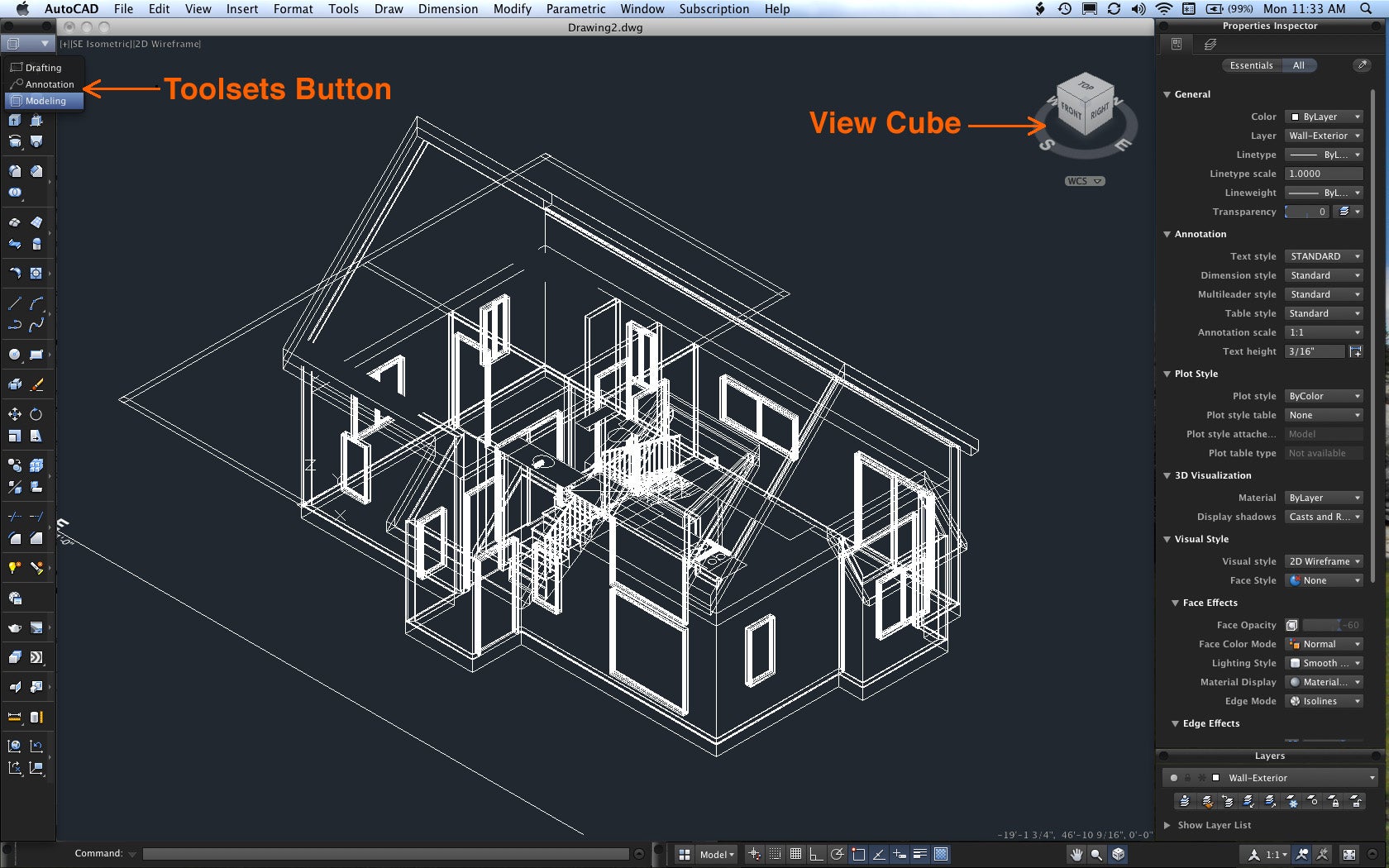
Auto CAD is a software commonly used by architects to design houses, building, motor vehicles etc. This software is made by auto-desk which is the same creators of 3D Max so it packs a lot of features that that helps architects to a lot with it's features.

 (http://images.macworld.com/images/article/2011/06/autocad-screenshotlarge-240760.jpg)
(http://computerupdate.org/wp-content/uploads/2015/01/autocad-logo.jpg)
3D Studiomax
3D studiomax is multi purpose 3D application that is considered the mother of all 3D applications. It has all the features to do anything with it, uses from it ranges from architecture, movies to gaming. Some of the most famous animated movies such as 2012, iron man, and avatar used 3D max for special effects and other 3D obejects.. Designed by auto-desk this software packs a lot of punch when it comes to features and it allows all types of modelling techniques from extrusion modeling to sketch modelling. The video below shows an animation made using 3D studio max.
 (https://dolpeer.files.wordpress.com/2010/01/maxscreen2.gif)
MAYA
Maya is also another 3D software made by auto desk mainly used for character creation. This software is purely used for movies and games production. Many AAA titles such as the witcher series has used maya as there 3D software for custscenes and such. Artists have created breathtaking visuals using this 3D software which only proves that how great it is and shows its power. The video shown below is a cut scene from The Witcher series created using MAYA
Auto CAD is a software commonly used by architects to design houses, building, motor vehicles etc. This software is made by auto-desk which is the same creators of 3D Max so it packs a lot of features that that helps architects to a lot with it's features.

(http://computerupdate.org/wp-content/uploads/2015/01/autocad-logo.jpg)
3D Studiomax
3D studiomax is multi purpose 3D application that is considered the mother of all 3D applications. It has all the features to do anything with it, uses from it ranges from architecture, movies to gaming. Some of the most famous animated movies such as 2012, iron man, and avatar used 3D max for special effects and other 3D obejects.. Designed by auto-desk this software packs a lot of punch when it comes to features and it allows all types of modelling techniques from extrusion modeling to sketch modelling. The video below shows an animation made using 3D studio max.
MAYA
Maya is also another 3D software made by auto desk mainly used for character creation. This software is purely used for movies and games production. Many AAA titles such as the witcher series has used maya as there 3D software for custscenes and such. Artists have created breathtaking visuals using this 3D software which only proves that how great it is and shows its power. The video shown below is a cut scene from The Witcher series created using MAYA
HA7 Task 4 - Mesh Construction
3D Modelling
3D modelling is done by artists who work on virtual 3D objects. In a games studio working environment. Film maker, designers architects etc uses 3D modelling to create animations, games, virtual models etc. There are many different methods o modelling 3D object each one of these methods has its own advantages and disadvantages. Some artists prefer one over the other because of certain properties they might like.
Polygonal modelling
A polygonal mesh is a combination of edges, faces and surfaces that combine to create a 3 dimensional object. Polygonal modelling is usually done by manipulating a simple primitive object using the tools from the 3D application that you are using to make a more complicated objects that consists of polygons and edges. Polygonal modeling is mostly used for scanline rendering and is a modeling method used for real time rendering (Rendering method used for video games). Polygonal modelling consists of using options such as subdivide and extrude to create more surfaces for 3D model from surfaces that already exist. This is also very similar to box modelling because that also consists of manipulating a 3D object to create a complicated object.

(http://www.webreference.com/3d/cararra/images/fig1_11.jpg)
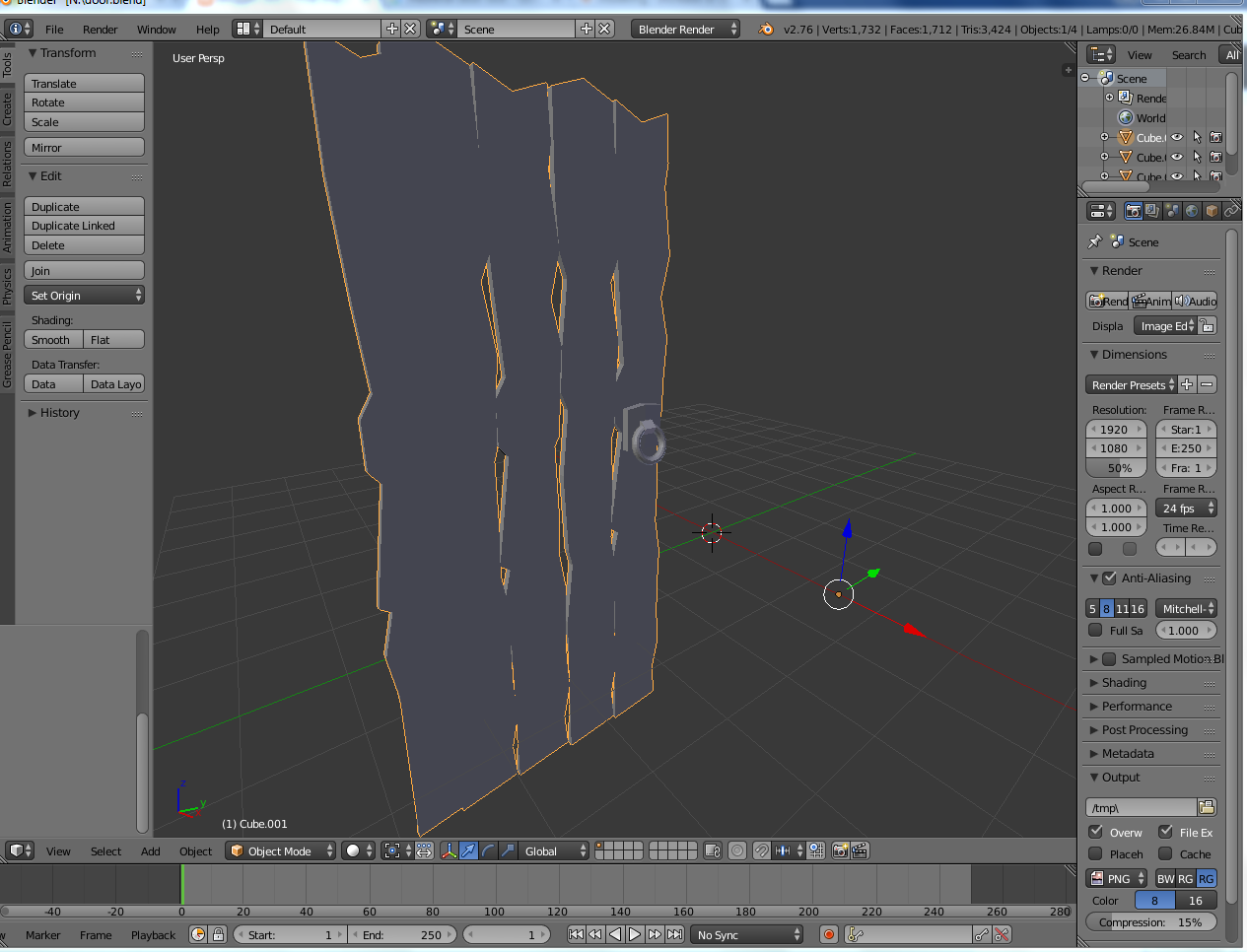
I have personally used polygon modelling for my final major project. I used a 3D software called blender to create an axe from polygon modelling. To create this I simply used a backdrop image of an axe to guide me through the space of it and I just copied and moved different polygons and points to create new surfaces and manipulate the models. I used the same technique for a number of more models within the project..


Primitive Modelling
Primitive modelling is one of the most common ways on 3D modelling. This consists of combining simple primitives such as cubes, pyramids, cylinder, spheres etc. to create more complicated 3D objects. Primitive modelling is the most basic and in most cases easiest technique used by beginners, but in the right hands this technique could be used very effectively to create highly detailed models. Many 3D artists combine primitive modelling with other techniques to make 3D models since it can be very effective. Primitive modelling is less likely to be used for real time rendering applications such as video games because it can be very heavy on the hardware when rendered, This is because of its high polygon count because of the multiple geometry used in one model. So in that sense this type of modelling isn't the most effective. Because of this primitive modelling is mostly used in CAD Systems for architecture based projects since it uses no real time rendering.
The video below demonstrates primitive modelling can be used. Its set in a CAD system because of the real time rendering issue I stated earlier.
I have also used primitive modeling to make a camera using different shaped like cubes and cylinder and put them together to make it. This was a very basic model of me trying out a new software I also use the same technique mixed with other types of modelling on my final major project. I also used this same method of modeling mixed with some of the other techniques to create a final robot model for the assignment which is also shown below.


Box modelling is also a very common way of producing 3d models. This is done simply by manipulating a box to create models with more polygons. I have previously done this type of modelling and I have produced a hammer from just starting with a box. The process uses a number of repetitive steps to reach the final product, which can lead to a more efficient and more controlled modelling process. Box modelling uses tools such as extrude, bevel and scale to create more surfaced from a surface that already exists to create a new model or manipulate an existing 3D model. This is a very efficient and fast way of modelling simple models and sometimes complicated ones. Box modelling gives the artist alot of space for creativity because of every node and surface being editable and can be used to create something new.
I also have first hand experience in using box modelling to create models of different complexities, In my opinion this is the easiest method of modelling I have tried yet because of it's simplicity and the room I have for creativity. I have used this method of modelling to create simple model shown first (Tardis) which took very little time because of its simplicity and the method used.

Shown below is the hammer I made using box modelling which took a longer time because of it's complexity and the number of surface I had to work with.


I've also made more models using box modelling for my final major project and other project before that which are shown below. These models took a longer time the previous ones because I mixed different methods of 3D modelling to make this to make them more simple. For an example the bed I've shown below uses primitive modelling as well as box modelling with slight polygonal modelling.


I have also done extrusion modeling myself to make a rifle, As you can see below . have used the first image which is a 2D image to produce a 3D model of it. to get the maximum detail I extruded the different parts of the riffle separately to get the right heights and lengths of them while extruding.


Sketch modeling used by some artists mainly make more detailed models like faces and such. This is a simple form of modeling that uses the same principle as making objects with clay or sculpting. In this king of modeling the artist is provided with a block which can be sculpted or manipulated in anyway to achieve any level of detail. Sketch modelling or sculpting is mainly used by character artists to create faces and other models that has to very highly detailed but doesn't have to pinpoint accurate because most of the sculpting is usually done by hand. Sketch modeling is usually used for games and animations in the film industry and the games industry. The games industry keeps the sketch modelling to a minimum because of performance issues with lower end hardware since there can be a lot of polygons in highly detailed models. But this is widely used with animation in the film industry because it is pre-rendered so there is no real time rendering performance issues to worry about.
The video below shows an example of sketch modelling.
I also have first hand experience using sketch modelling for my final major project. I used the sculpting tool in blender to make some rocks but I used an extension in blender to lower the polygon count by deleting un-wanted extra polygons.


3D scanners
3D scanners are used to scan real life 3D objects to get them in a virtual space which then can be changed to anything the artists wants. Since these scanners and all equipment needed are expensive these are only used by researchers and other industry professionals at the moment. But there are some cheaper 3D scanners for home use but they are not as accurate as in the industry 3D scanners. This method can be sued to get accurate real life objects into a virtual space and it also can save alot of time for 3D artist when working in a project. The only bad this about this is that it will need some tweaking after the object is scans since it does not have any control of poly counts for games and how detailed its going to be. This method is almost never used in the Film industry because anything that can be scanned in as a 3D object can just be used in real life, but this could be a great way easier method to create 3D objects for games if performance isn't an issue.
 (http://upload.wikimedia.org/wikipedia/commons/2/26/VIUscan_handheld_3D_scanner_in_use.jpg)

3D modelling is done by artists who work on virtual 3D objects. In a games studio working environment. Film maker, designers architects etc uses 3D modelling to create animations, games, virtual models etc. There are many different methods o modelling 3D object each one of these methods has its own advantages and disadvantages. Some artists prefer one over the other because of certain properties they might like.
Polygonal modelling
A polygonal mesh is a combination of edges, faces and surfaces that combine to create a 3 dimensional object. Polygonal modelling is usually done by manipulating a simple primitive object using the tools from the 3D application that you are using to make a more complicated objects that consists of polygons and edges. Polygonal modeling is mostly used for scanline rendering and is a modeling method used for real time rendering (Rendering method used for video games). Polygonal modelling consists of using options such as subdivide and extrude to create more surfaces for 3D model from surfaces that already exist. This is also very similar to box modelling because that also consists of manipulating a 3D object to create a complicated object.

(http://www.webreference.com/3d/cararra/images/fig1_11.jpg)
I have personally used polygon modelling for my final major project. I used a 3D software called blender to create an axe from polygon modelling. To create this I simply used a backdrop image of an axe to guide me through the space of it and I just copied and moved different polygons and points to create new surfaces and manipulate the models. I used the same technique for a number of more models within the project..


Primitive Modelling
Primitive modelling is one of the most common ways on 3D modelling. This consists of combining simple primitives such as cubes, pyramids, cylinder, spheres etc. to create more complicated 3D objects. Primitive modelling is the most basic and in most cases easiest technique used by beginners, but in the right hands this technique could be used very effectively to create highly detailed models. Many 3D artists combine primitive modelling with other techniques to make 3D models since it can be very effective. Primitive modelling is less likely to be used for real time rendering applications such as video games because it can be very heavy on the hardware when rendered, This is because of its high polygon count because of the multiple geometry used in one model. So in that sense this type of modelling isn't the most effective. Because of this primitive modelling is mostly used in CAD Systems for architecture based projects since it uses no real time rendering.
The video below demonstrates primitive modelling can be used. Its set in a CAD system because of the real time rendering issue I stated earlier.
I have also used primitive modeling to make a camera using different shaped like cubes and cylinder and put them together to make it. This was a very basic model of me trying out a new software I also use the same technique mixed with other types of modelling on my final major project. I also used this same method of modeling mixed with some of the other techniques to create a final robot model for the assignment which is also shown below.


Box Modelling
The video below demonstrates box modelling in a more complicated scale. The artist uses settings such as subdivisions, extrusion, bevel and move tools to manipulate and create new surfaced to make the head.
I also have first hand experience in using box modelling to create models of different complexities, In my opinion this is the easiest method of modelling I have tried yet because of it's simplicity and the room I have for creativity. I have used this method of modelling to create simple model shown first (Tardis) which took very little time because of its simplicity and the method used.


Extrusion modelling
Extrusion modelling is done by using a 2D object to make a surface and then extruding that surface in a 3 dimensional space to produce a 3D object. This way is most useful when using a reference to to make a 3D Object. In some software like CAD this is the main way to produce 3D models. Drawing a 2D outline of the object you want to make and then use the extrusion tool to make it 3D, then the user has the ability to manipulate this object to make it look better. Polygonal modelling can be very usefull when making real life objects in 3D space true to an existing real life object. For an example If I were to make a car that already exists I can use extrusion modelling to create a 2D representation of the real car and then extrude it to get the general shape and size of the objects.
The video below briefly shows how extrusion modeling is done
The video below briefly shows how extrusion modeling is done
I have also done extrusion modeling myself to make a rifle, As you can see below . have used the first image which is a 2D image to produce a 3D model of it. to get the maximum detail I extruded the different parts of the riffle separately to get the right heights and lengths of them while extruding.


I've also used this method of modelling in prior to this course for a house plan design I've made using CAD. For the model below I've used a 2D plan for the house to extrude it and then make a 3D model out of it. I extruded different parts of the house separately to get the right sizes of each part.

Sketch modeling
Sketch modeling used by some artists mainly make more detailed models like faces and such. This is a simple form of modeling that uses the same principle as making objects with clay or sculpting. In this king of modeling the artist is provided with a block which can be sculpted or manipulated in anyway to achieve any level of detail. Sketch modelling or sculpting is mainly used by character artists to create faces and other models that has to very highly detailed but doesn't have to pinpoint accurate because most of the sculpting is usually done by hand. Sketch modeling is usually used for games and animations in the film industry and the games industry. The games industry keeps the sketch modelling to a minimum because of performance issues with lower end hardware since there can be a lot of polygons in highly detailed models. But this is widely used with animation in the film industry because it is pre-rendered so there is no real time rendering performance issues to worry about.
The video below shows an example of sketch modelling.
I also have first hand experience using sketch modelling for my final major project. I used the sculpting tool in blender to make some rocks but I used an extension in blender to lower the polygon count by deleting un-wanted extra polygons.


3D scanners
3D scanners are used to scan real life 3D objects to get them in a virtual space which then can be changed to anything the artists wants. Since these scanners and all equipment needed are expensive these are only used by researchers and other industry professionals at the moment. But there are some cheaper 3D scanners for home use but they are not as accurate as in the industry 3D scanners. This method can be sued to get accurate real life objects into a virtual space and it also can save alot of time for 3D artist when working in a project. The only bad this about this is that it will need some tweaking after the object is scans since it does not have any control of poly counts for games and how detailed its going to be. This method is almost never used in the Film industry because anything that can be scanned in as a 3D object can just be used in real life, but this could be a great way easier method to create 3D objects for games if performance isn't an issue.


(https://3dprint.com/wp-content/uploads/2014/06/itseez-scan.png)
Subscribe to:
Posts (Atom)